With all these new Mega Drive releases lately we've had a lot of
people complain about cartridges being of low quality and potentially
putting consoles at risk. Shouting at a dying forum or something is not
going to help any vendors realize what they're doing wrong, so
I'm quickly putting together here what to look out for. This probably
deserves a proper page with strict specs to follow some day.
5V vs 3.3V components
Yes, this thing again.
Mega Drive is a 5V machine and everything on the cartridge slot is 5V.
Modern components are usually 3.3V instead (or even 1.8V). Now, using
modern components is great, you can get cheap Flash memory that way! But
you absolutely must not mix 5V and 3.3V signals as-is.
If you're using 3.3V (or 1.8V) components, you must use a
voltage regulator and level shifters (the former generates 3.3V VCC out of
5V VCC, the latter converts signals between both voltages). Connecting 5V
directly to 3.3V components risks damage long term, in particular to the
latter.
Board beveling
The hot topic of the day!
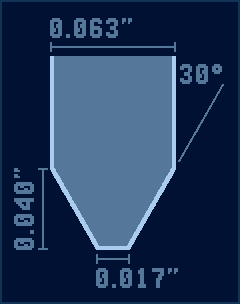
Something that may be easy to overlook is that the bottom of the board
should be beveled (i.e. thinned down). This is important to reduce risk of
damaging the cartridge slot: if the board isn't beveled then
there's little room for margin to maneauver and you risk pushing down
the pins when inserting the cartridge, potentially damaging it permanently.
With beveling the board is easier to insert and pins will be at most pushed
a bit outward instead, which is much safer.
Here's how the bottom of the board should look like (based on that PDF
called GEN-CART-BASIC-fabnotes.pdf that keeps circulating
around), note that 0.063 inches is a common thickness for boards:
Chamfered corners
Related to the above, the bottom corners of the board should also be
chamfered in a similar way, making them more rounded instead of hard
corners. This one isn't as critical at least (failing to do this
simply makes it a bit harder to seat or unseat the board) but you should
still try to do it.
Ground shield
This one is easy to miss if one isn't putting much thought into it,
but ideally you should cover up any empty space in the board with a trace
to GND. This acts as a RF shield and helps reduce risk of interference with
other nearby electronics.
Bringing this up since I've seen a few boards without it.
One last note
Check the actual boards please. I'm seeing a lot of
people going "they make shitty cartridges!" over stuff that was
done wrong long ago but nobody bothering to confirm if their newest
releases still do it, or what they are doing wrong (because without details
we have to assume the absolute worst). It starts getting hard to trust
those comments if we can't tell for sure if they're still true
nowadays (they may be, but we can't tell).
This gets even more important as new issues are found. Board beveling is
something that people only started paying attention like last year or so.
I'm sure that we'll find yet more issues in the future that
we're currently ignoring, and we're probably going to be slamming
manufacturers for getting that wrong back when nobody was paying attention.
I suppose there's also some mea culpa for not having put together yet
a page giving full specs for cartridges to follow. It's very easy to
get everything wrong when there isn't any checklist to follow, after
all!
One of the Mega Drive features is being able to run Master System games
with an adapter. The Game Gear is mostly a handled Master System, but it
has enough differences that playing those games on a Mega Drive isn't
feasible (colors are all wrong, and also the Start button doesn't work
so most games can't go past the title screen).
Some time ago krikzz revealed the Mega Everdrive Pro's features and
one of the things is does is running
NES games. It works by having part of the NES running on its FPGA and
letting the Mega Drive handle video output. Now, this is just a
"bonus" feature and it doesn't work great (CHR-ROM bank
switching is a big problem), but for many games it should be good enough.
On the other hand this also got me wondering if it'd be feasible to
take the same approach with the Game Gear. Its VDP is significantly less
flexible than the NES PPU, so maybe the results could be better?
So here's an idea of how I think it could work (feel free to copy
them). Note that the goal here is to try making most games work, but
it's not gonna be 100% perfect unless take over the video output with
a passthrough cable like the 32X.
Core
Would work like the NES support in the Mega Everdrive Pro, with a Z80 core + I/O ports in the cartridge. Kinda wasteful when there's already a Z80 in the console itself, but I can't see any other way this could work.
68000 would be in charge of interfacing between the Z80 core and the rest of the Mega Drive. The core would convert some of the stuff on the fly (as well as some logging) so the 68000 can move around data directly as-is.
Video
The graphics would work as follows:
Mega Drive VDP would run in mode 5.
Game Gear sprites would be done with sprite layer (low priority).
Game Gear tilemap would be done with plane B layer (both priorities).
Plane A (high priority) would be used to draw a border around the Game Gear's viewport.
On VRAM/CRAM accesses:
Game Gear doesn't have DMA and is slower than the Mega Drive at writing to video memory, so hopefully time isn't an issue. The 68000 can't really track all the writes being done so it may be best to make a log and then let the 68000 process them all at once.
On the other hand, data in VRAM could be either a tile or part of a table, and trying to guess from the register values may not be a great idea (tile graphics may be written in a tilemap area where it doesn't display them), so we may need to write all VRAM data twice (once as tile, once as table).
The above also implies that tables will need to be allocated separately from tiles. Thankfully the Mega Drive has more than enough VRAM for this (64KB vs. 16KB).
Mode 4 (Game Gear) uses planar while mode 5 (Mega Drive) uses chunky, so tiles would need to be converted on the fly.
Tables are also in different formats, so that would need to be converted as well. Tilemap writes probably can be converted and written as is (some bits are shuffled around), but the sprite table is another matter. May be better to buffer the sprite table in the cartridge and convert it all in one go to transfer to VRAM once a frame.
On the tilemap layer:
Game Gear tilemap is 32×28, which is kind of an issue since Mega Drive's VDP only does powers of two. Probably the best idea would be to use 32×32, then do a raster effect where vscroll is changed mid-screen at the appropriate line in order to cut out the excess 32px.
Game Gear's VDP can't change vertical scroll mid-screen (the write latches but doesn't take effect until next frame), only horizontal, so that makes things simpler. It'd be probably best to log writes to the horizontal scroll register and then let the 68000 take the log and load it to the horizontal scroll table. This requires horizontal scroll to be in line scrolling mode.
Master System has a feature where the top and/or right of the tilemap can be fixed (instead of scrolling), but they're off screen in the Game Gear's case so we can ignore it.
On sprites:
Mode 5's sprite capabilities should hopefully be enough. We need 64 sprites, and sprites can be either 8×8 or 8×16.
Mode 5 would require 20 sprites to hit the sprite limit per line, while mode 4 only needs 8. This may result in some clipping effects not working. On the other hand, it'll also prevent flickering in many games, so whether it's a problem or not is up to you.
MAG bit doesn't work at all on Mega Drive, so we probably can't support this feature. I don't think it's used much on Game Gear anyway? (only one game comes to mind that would suffer heavily, and that one has a workaround)
On the palette:
Colors would need to be dropped to 3-bit per component (Game Gear does 4-bit). It looks worse, but it's the best we can do realistically and Game Gear can't display many colors on screen, so there shouldn't be too many issues over soft gradients.
Changing the palette mid-screen may be a bigger problem, though I think that for most games you can get away with just delaying them until vblank anyway.
Input
68000 would be reading the controller every frame and passing its buttons
to the Game Gear core. D-pad would be mapped as-is, B and C to buttons 1
and 2, and Start to… Start.
Probably nobody will bother with the Gear-to-Gear cable, but if you
*really* insist, the port used by it is practically the same you can find
on the Mega Drive itself (serial mode included!), so you could attempt to
pass it onto the player 2 port… but you'd need a custom cable,
another Game Gear or Mega Drive, and timing may make it unfeasible anyway.
Audio
68000 would take the current volume and pitch of every channel and pass them to the Mega Drive's PSG once a frame. This means PCM playback won't work (though it's rarely ever done), but otherwise should be fine in practice.
Stereo would be ignored, since the Mega Drive's PSG is mono only. Not nice but it's far from the worst problem we could have. Bear in mind that some games mute PSG channels by disabling both speakers (instead of setting volume to quietest), so you still need to check for that.
Alternatively, you could implement a stereo PSG in the cartridge itself and
push its output through the audio-in lines in the cartridge slot, which
solves all the issues (but wouldn't be as fun :P).
Compatibility issues
Now obviously the above shows that compatibility isn't going to be
perfect, and I'm not that well versed on the Game Gear catalog, but I
can think of a few cases that are obviously problematic:
Sonic Blast uses raster effects to do the sky gradient in the first zone, so expect the sky to become a flat color instead.
The lack of MAG sprite support means that Virtua Figther Mini won't look right unless you force the camera to be zoomed out.
A few games do weird stuff with the tilemap address for HUD purposes which may or may not break. Not exactly common, but worth mentioning.
Super Game Boy approach
On the other hand we could take Nintendo's approach which was to put
the entire hardware in the cartridge and treat the console as a glorified
passthrough that just passes over controller inputs. Audio can go through
the audio-in lines in the cartridge slot, so that isn't a problem.
Video is another issue. Display is 160×144, but Game Gear can output up to
31 colors (which won't fit in a single tile) so we need to send *two*
screenfuls. That'd be 720 tiles to transfer. That'd require
extending vblank to get all the bandwidth we can, which means the border
will have to be a solid color. Assuming 320×224, that'd require 117
lines to transfer (ignoring overhead). With the extra vblank time we get
from disabling display in the border we get… 112 lines (in NTSC). Oops.
Many Game Gear games push against the borders of the screen, so trying to
remove lines is probably not an option, which means you'd need to get
accustomed to tearing. You could try to optimize by avoiding sending tiles
that haven't changed or don't need both palettes, though it only
reduces the chance of it being an issue and would be harder to implement.
Oh, and don't forget about the palettes. Again, the above was all
assuming the palette doesn't change mid-screen, which breaks some
raster effects. Trying to transfer 31 colors per line is not easy. You
could probably disable display mid-line (the borders to the sides really
help here), but even then expect to still see a few CRAM dots on the sides
of the screen.
I've already seen at least a couple of homebrew games trip over this
so I think this deserves a warning.
Do not rely on undefined behavior when reading the YM2612
status. The behavior differs between hardware revisions, and your game will
break on a lot of consoles if you don't follow this advice.
If you're using one of the popular sound drivers this shouldn't
be an issue, but if you're making your own sound code, mind the
following:
Only read the YM2612 status from $4000, never from $4001~$4003.
Only rely on bits 7 (busy), 1 (timer B) or 0 (timer A). The value of bits 6-2 is undefined and depends on the hardware model.
In particular, always make sure to read only from $4000 (or
$A04000 if accessing from 68000), and to not expect a
particular byte value to show up. If you're waiting for the YM2612 to
stop being busy, only check bit 7 and ignore the rest, if you're
waiting for the timers then only check the relevant bit.
Just because it works on your console doesn't mean it will work on all
of them. If you can't afford to test multiple revisions then at the
very least follow the above advice to get you out of trouble.
Explanation
The Mega Drive underwent several hardware revisions over time to reduce
costs. In particular, there are two major variants of the YM2612 in use
(the original discrete YM2612 and a later YM3438-based variant integrated
into the main ASIC). On top of that the Teradrive uses a discrete YM3438.
These variants differ in how they handle reading the status port in
undocumented ways. Some variants only return a valid status value on the
first address ($4000), and on top of that the values of bits
6-2 may be either zeroes or a previously written value depending on which
variant it is (which is why you should ignore their value).
Published on 2019-nov-15, last updated 2019-nov-15
Earlier this month I purchased a Retroflag Controller-M and I thought I may
as well make write a review of it. Testing involved playing Xeno Crisis, a
full playthrough of Arkagis Revolution and iwis slapping the buttons
because she likes clicky sounds.
Here's the link for the
official Amazon listing for the controller. As a disclaimer, I bought
it from a local store in Argentina instead (to avoid having to deal with
import headaches).
Retroflag's controller looks pretty similar to a Mega Drive 6-button
controller, down to the size. There are some practical concessions however:
there's a Select button on top of the Start button, and instead of a
Mode button there are L and R buttons. The latter two are built to look
like the original Mode button, which is nice.
(iwis claims that it's not L and R buttons but "weft mode"
and "wight mode" buttons)
The D-pad seems to happily take all the abuse going on so far (turns out
Arkagis Revolution is surprisingly hard on the D-pad), albeit of course the
question is how many months it will last. At least pressing the directions
feels nice. The L and R buttons may be a bit too easy to press, so
be careful where you place your fingers, but everything else seems OK.
The Controller-M shows up as either a generic XBOX controller (if in XInput
mode) or a generic retro controller (if in DirectInput mode), so get ready
to rebind buttons (at least the button mappings seem decent). This may or
may not be an issue depending what you're using, the controller lets
you swap Z/C with L/R if really needed. The controller also works with a
Switch, according to their site.
If you're OK with the original 6-button controller's size and are
ready to rebind buttons, you should be fine.
Known issues
medfanen doesn't like the controller in XInput mode (Z and C aren't responsive), you'll need to switch to DirectInput mode to work around this issue.
Input details
The controller maps its buttons like this:
D-pad maps as-is
A/B/X/Y map as-is
Z maps to L1
C maps to R1
L maps to L2
R maps to R2
Start maps as-is
Select maps as-is
Retroflag's site includes how the controller buttons map to a modern
controller's buttons, but the box also mentions some features that
I'm going to include here in case somebody loses the box and needs
help:
Hold down X while plugging in to switch to XInput mode (stays even after you unplug).
Hold down Y while plugging in to switch to DirectInput mode (stays even after you unplug).
Hold down Select+L+R for three seconds to swap Z/C and L/R.
Hold down Select+L+A/B/X/Y to toggle turbo for A/B/X/Y (apparently C and Z can't use turbo).
Something that annoys me is how people seem obsessed with looking
"authentic" and how they think you absolutely need to provide
unique box designs for every region (and of course both "old" and
"new" designs for each, since the designs changed halfway through
the console's lifetime). Does anybody realize how much of an inventory
hell is this?
Worse yet, there's the trademark infringement issue — they just look
too close to the official Sega designs, and Sega definitely has trademark
on those again nowadays (both because of Sonic Mania and because of the
Minis, not to mention all the Mega Drive merchandise). No, using "16
BIT CARTRIDGE" doesn't change the fact the design is still too
close, if anything it only makes it look like a cheap bootleg.
Also, it's not like we're selling these games at local stores
that you walked in and looked at the shelf for a game to rent or buy, but
rather at on-line stores that sell globally, if not outright a Kickstarter
campaign. That also kills the "authenticity" aspect really hard.
On top of that, our new games look nothing like the ones from back in the
day, as our culture has changed a lot since then.
Can we just admit that this isn't the '90s and acknowledge
we're doing a whole new thing?
So what then?
I'd honestly prefer if we just dropped the Sega-like designs and let
the game artwork fill the whole box. When we aren't pretending to be a
Sega knock-off the boxes will look a lot better and feel less
"bootleg", and you avoid risking the anger of a lawyer who may be
in bad mood that day. Also, it means you just need a single box design and
won't need to worry if you sell too much or too little of a given
edition.
Acknowledging that we're a global market (if niche) also means no
region lockout. Thankfully I haven't really seen trouble over this
yet, but it means you should always consider "universal" shells
when possible (those that fit in both Western and Japanese consoles). This
way nobody has to worry about whether a game will work in their console or
not, and again the inventory benefit of not having to worry about multiple
editions.
Also don't forget to check out commercial
homebrew guidelines in this site! There's some useful advice
there, coming mostly from previous experiences. Learn from our past
mistakes and you'll make everybody's lives easier.